
Weather Kitty - App & Widget
Weather Creative Inc.Weather
4.914.12K Reviews
- Version
- 6.2.12
- Installs
- 1.00M
- Age Rating
- Teen
Screenshots
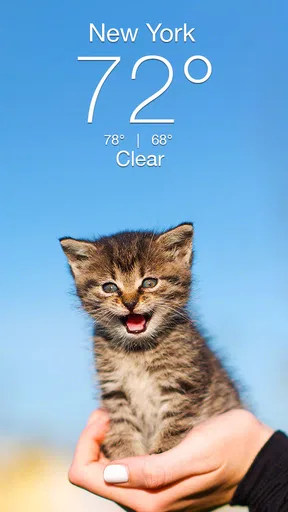

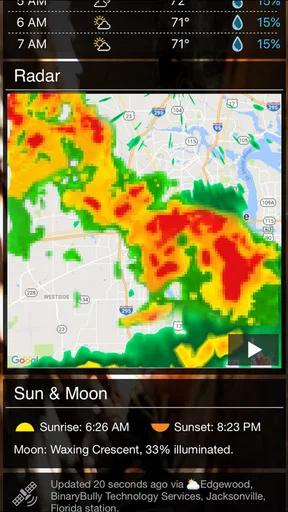
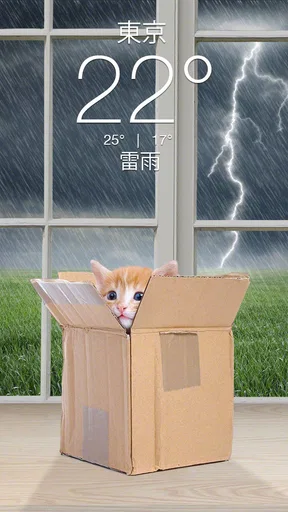

Our Review of Weather Kitty - App & Widget
 Analysis by Appyee
I like weather apps that make a routine feel a little less dull, and Weather Kitty - App & Widget has a clear personality from the moment I open it. Its cat imagery gives the forecast a lighter feel, while the practical appeal is still checking what the day may bring. That balance is the reason I’d consider it for a phone I use throughout the day, rather than treating it as a novelty that I open once and forget.
A forecast habit that stays simple
My most useful routine with a weather app is also the least complicated: check the conditions before getting dressed, then take another look before leaving. Weather Kitty supports that kind of quick check with current conditions and a forecast view that includes temperature, humidity, wind speed, and upcoming days. I can glance at the basics first and spend longer on the details only when the weather might change my plans.
For example, before a commute I’d check whether the day looks comfortable for walking or whether wind and temperature suggest carrying another layer. If I’m planning an outdoor errand later, the hourly view is more relevant than a single current reading. The useful habit is to compare the forecast with the time I’ll actually be outside, not simply assume that the weather at the moment will hold all day.
The cat artwork makes repeated checks more cheerful, but it doesn’t replace the forecast itself. I’d use the app to help plan ordinary decisions, not as a reason to ignore changing conditions or as a specialist source for situations where precise, critical weather information matters.
Settings that make a difference
Weather Kitty is more useful when the display reflects what I actually look for. Its dashboard can be customized, so I’d put the details I routinely check within easy reach and avoid making every visit a tour through information I rarely use. If wind matters for a planned walk or humidity affects how comfortable a day feels, those details deserve attention; if not, the main forecast may be enough.
It is worth spending a little time choosing a theme, too. The cat designs are part of the app’s personality, and picking one that suits your taste can make the home screen and forecast feel more personal. That’s a small choice, but it can be the difference between enjoying a quick check and finding the decoration distracting. I’d treat visual customization as a preference, not as a feature that changes how reliable a forecast is.
The widget is another practical setting to consider. It brings weather information and a cat image to the home screen, making a glance possible without opening the full app. I’d place it somewhere I naturally look, then use the app itself when I want to inspect the hourly outlook or compare locations. That division keeps the widget useful rather than expecting it to answer every question.
Useful for more than one place
The multiple-location feature is handy when my day involves more than one city. I can keep an eye on home and a destination, or check conditions where family or friends are, instead of repeatedly replacing the place I’m viewing. This is especially useful before a trip: compare the forecast for the destination with the weather where you are now, then pack for the conditions you’ll meet rather than the ones outside your window.
There is a trade-off, though. More locations mean more information to switch between, so I’d keep the list focused on places I genuinely need. A short set of relevant cities is quicker to scan than a collection of destinations I might visit someday. For day-to-day use, the home location should remain the one I can reach most easily.
Who will enjoy the style—and who may not
If a standard forecast screen feels lifeless and you like cats, this app has an obvious appeal. The decoration is not just a one-time joke: it gives a repetitive task a distinctive look. I can see it working particularly well for someone who checks the weather often, wants an at-a-glance widget, and values a friendly interface as much as a plain list of measurements.
On the other hand, someone who wants the most restrained presentation may prefer a conventional weather app. The artwork is central to Weather Kitty’s identity, so it is not the best match if cute visuals feel like clutter. And if your main need is specialist forecasting or detailed severe-weather decision support, I’d choose a service built around that purpose and treat this as a convenient everyday companion instead.
Weather with a Side of Cuteness
First things first, let’s talk about the concept. Weather Kitty isn’t just about giving you the latest weather updates; it’s about doing so with a splash of cuteness. Every time you check the weather, you’re greeted by an adorable kitty image. There are different themes to choose from, like "Summer Fun" or "Grumpy Cats," that spice up your daily weather check. If you’re a cat lover, this app is a match made in heaven.
Features You’ll Love
Now, let’s get into the nitty-gritty. The app isn’t just a pretty face. It provides comprehensive weather data including temperature, humidity, wind speed, and forecasts up to a week in advance. You can also customize your dashboard to show the information that matters most to you. Need to see the hourly forecast for the day? No problem, it’s all there at a swipe.
And if you’re someone who travels a lot, the app has got you covered with its multiple location feature. You can track weather in several cities simultaneously, which is super handy for those on the go.
User Experience
The user interface is intuitive and user-friendly. Navigating through the app is a breeze, and everything is laid out in a way that makes sense. You’re not going to spend a lot of time hunting for info. Plus, the addition of cute cat images doesn’t clutter the screen; they’re perfectly integrated to enhance your experience without being overwhelming.
What’s more, the app includes a widget feature, so you can have your weather updates and a kitty on your home screen without even opening the app. Talk about convenience!
Why It Stands Out
There are a ton of weather apps out there, so what makes this one special? It’s the blend of functionality and fun. It’s rare to find an app that makes you smile every time you use it, and Weather Kitty does just that. It’s like having a little piece of joy right in your pocket.
And don’t worry about ads ruining the experience; the app is pretty light on ads, and there’s an option to go ad-free if you decide to upgrade.
Using the app as a repeatable routine
After setting up the display, I’d keep the routine deliberately small: check the widget when I first pick up my phone, open the app if I need the hourly forecast, and look at another saved city only when I have a concrete reason. That pattern makes the playful presentation a bonus instead of a detour. It also reduces the temptation to keep reopening a forecast that has not meaningfully changed my plans.
A practical example is planning a lunch break outdoors. I’d use the home-screen glance to decide whether it looks promising, then check the hourly information before committing if the timing matters. For a weekend visit, I’d add or select the destination and compare its outlook with home before packing. The distinction is simple but useful: widgets suit quick orientation; the full app is better when I’m making a decision that depends on timing or another location.
People often wonder whether a widget makes the app unnecessary. In my view, it does not; it handles the repeat glance, while the app remains the place to inspect more of the forecast. Likewise, several saved cities are helpful only if they map to real parts of your life. The commute, a regular destination, or a family member’s city can justify a place in the list; an ever-growing set of hypothetical stops usually cannot.
How it compares with everyday weather apps
Compared with a plain weather utility, Weather Kitty’s strongest difference is the mood of the experience, not a claim that it replaces every forecasting tool. A conventional app may be a better fit if you want a minimalist screen with no character art. Here, the cats give the forecast a memorable visual identity, and the customizable dashboard helps keep practical details in view. For someone who likes a warmer interface, that is a meaningful advantage rather than decoration for decoration’s sake.
I would not choose between weather apps based on personality alone. If you depend on detailed specialist information for work, outdoor operations, or a safety-sensitive plan, use an option designed for that level of decision-making. Weather Kitty makes more sense as the app you reach for to check ordinary local conditions and plan a normal day. It can be the pleasant everyday choice without needing to be the only weather source on your phone.
The app is free to download, with optional in-app purchases ranging from $0.99 to $49.99 per item. I’d decide whether any paid extras are worthwhile only after trying the basic experience and checking what the particular purchase offers; there is no need to spend just to find out whether the cat-forward approach suits you. The developer is Weather Creative Inc., and the app has a 4.9 average from around 75,000 ratings, with roughly 14,000 written reviews and over one million installs. Those figures suggest a well-liked product, though they cannot tell me whether its style will fit your own taste.
Small trade-offs that shape the experience
The same visual identity that makes the app distinctive may be its main friction. A person who wants the forecast to disappear into a clean, information-first screen may find the cat imagery more prominent than they’d like. I’d try a theme and dashboard arrangement before deciding; if the presentation still gets in the way, switching to a simpler alternative is a sensible choice, not a failure to appreciate the app.
There is also a difference between having a forecast available and knowing exactly what to do with it. Temperature alone does not tell me whether an outdoor plan will feel comfortable, which is why the wind and humidity details can be worth checking alongside the hourly outlook. I’d avoid turning any single reading into a guarantee, especially when a plan depends on conditions staying suitable. The app is most useful as a planning aid for everyday choices, with judgment still in the loop.
Another practical point is screen space. A widget is convenient because it removes a step, but home screens are already crowded for many people. I’d keep it only if I actually use it; otherwise opening the app when needed may be less distracting than reserving a permanent spot. On a shared or work-focused phone, the playful look may also be less appealing than a neutral weather display, even if the information is useful.
Availability and fit
Weather Kitty is a weather app from Weather Creative Inc. Its current version is 6.1.8, it has been available since October 10, 2014, and it is rated Teen. It requires Android 7.0 or later. That makes the Android system requirement worth checking before installing on an older device; iOS users should check compatibility on their own device before downloading. The app’s long presence and broad adoption are reassuring context, but the right test is still whether it fits the way you check weather.
If you are deciding whether to try it, I’d ask three practical questions: Do you enjoy cat-themed visuals? Would a home-screen widget make you check conditions more consistently? Do you mainly need an everyday forecast rather than specialist weather tools? If the first two answers are yes and the last describes your needs, it is a promising match. If you prefer a bare, highly technical display, or need weather information for critical decisions, another category of tool is a better starting point.
Final Thoughts
Is Weather Kitty - App & Widget for everyone? Maybe not. But if you’re someone who appreciates the quirky, or if you simply love cats, this app offers a delightful way to stay informed about the weather. It’s functional, fun, and it adds a little sunshine to your day, even if the forecast is cloudy.
So there you have it, folks. A weather app that does more than just tell you the forecast—it brightens it up with a little feline charm. Whether you’re a cat enthusiast or just looking for a new way to check the weather, give Weather Kitty a try. It might just become your new favorite app.
Privacy and Permissions
See what permissions an app requests and how it handles your data.
- Identity
- find accounts on the device
- Contacts
- find accounts on the device
- Location
- approximate location (network-based), precise location (GPS and network-based)
- Photos/Media/Files
- read the contents of your USB storage, modify or delete the contents of your USB storage
- Storage
- read the contents of your USB storage, modify or delete the contents of your USB storage
- Microphone
- record audio
- Wi-Fi connection information
- view Wi-Fi connections
- Other
- view network connections, pair with Bluetooth devices, access Bluetooth settings, connect and disconnect from Wi-Fi, full network access, run at startup, control vibration, prevent device from sleeping, Google Play license check, read Google service configuration
Verdict
Strengths of Weather Kitty - App & Widget
- Adorable cat themes brighten the forecast.
- Easy-to-use interface for quick updates.
- Customizable widget options for home screen.
- Accurate weather data from trusted sources.
- Regular updates keep app running smoothly.
Limitations of Weather Kitty - App & Widget
- Limited free features without subscription.
- Ads can be intrusive in the free version.
- No radar maps for severe weather updates.
- Widget customization options are limited.
- Occasional bugs in the widget display.
Other Releases by Weather Creative Inc.
View All
Weather Puppy - App & Widget
Weather4.9

Weather BUB
Weather4.9

Grumpy Cat Weather
Weather4.9

Wildlife Weather
Weather4.7
Similar Picks in This Category
View All
Weather - By Xiaomi
Xiaomi Inc.4.1

Weather & Radar Forecast
WetterOnline4.8

Weather
OneLouder Apps4.6

AccuWeather: Weather Radar
AccuWeather3.6

The Weather Channel - Radar
The Weather Channel4.6

1Weather Forecasts & Radar
OneLouder Apps4.3
Frequently Asked Questions
What features does Weather Kitty offer that differentiate it from other weather apps?
Weather Kitty provides standard weather information such as current conditions, hourly and weekly forecasts, and severe weather alerts. What sets it apart is its delightful user interface featuring adorable cat images that change based on the weather and time of day. It also includes widgets for quick access and customization options.
Is Weather Kitty available for both Android and iOS devices?
Yes, Weather Kitty is available for download on both Android and iOS platforms. Users can find it on the Google Play Store for Android devices and the Apple App Store for iOS devices. The app is designed to be user-friendly on both operating systems, offering a seamless experience across different devices.
Does Weather Kitty require a subscription or in-app purchases?
Weather Kitty is free to download, but it offers in-app purchases for additional features. Users can opt for premium packs that provide more cat themes and remove ads. The free version includes basic functionalities, making it suitable for users who prefer not to spend money on apps.
Can I customize the appearance of Weather Kitty’s widgets?
Yes, Weather Kitty allows you to customize its widgets. Users can choose from various cat themes and adjust the widget size to fit their home screen layout. This personalization feature ensures that you can tailor the app's appearance to match your preferences and device aesthetics.
How accurate are the weather forecasts provided by Weather Kitty?
Weather Kitty sources its data from reputable weather services, ensuring a high level of accuracy for its forecasts. While no weather app can guarantee 100% precision, users generally find Weather Kitty reliable for planning daily activities. It also offers real-time updates to keep users informed of any changes.
